
What a DPO needs to sign off an AI deployment
A DPO cannot sign off an AI deployment based on a product description or a sales deck. They need documented answers to specific questions about the specific deployment in the specific organisational context. The questions are consistent regardless of which AI platform is involved.
DPO question | Why they ask it | Arto provides | Organisation provides |
What personal data is being processed? | To assess lawful basis, minimisation and DPIA scope | Assurance Designer documents data scope per workflow. Audit trail records every data access event. | Confirm scope is accurate and appropriate for the specific service context. |
What is the lawful basis for processing? | UK GDPR requires an identified lawful basis for every processing activity | Assurance Designer includes the lawful basis section with public task (Article 6(1)(e)) as the default for public sector workflows. | Confirm public task applies to this specific workflow. Document and sign off. |
Is a DPIA required, and has one been completed? | UK GDPR Article 35 requires a DPIA for high-risk processing. Most public sector AI workflows meet the threshold. | Assurance Designer pre-populates DPIA supplementary evidence for Arto Supported Flows: technical safeguards, data minimisation controls, human oversight documentation. | Complete the DPIA narrative, assess residual risk and obtain senior responsible officer sign-off. |
What data minimisation controls are in place? | To confirm AI only accesses data necessary for the defined purpose | KSB profile restricts the AI agent's data access to the defined scope. Audit trail records exactly what data was accessed on each run. | Confirm the defined scope is appropriate. No additional controls required for Arto Supported Flows. |
Is there human oversight? Can decisions be reviewed? | To confirm AI does not make solely automated decisions that engage Article 22 | HITL Control Centre enforces officer review at defined decision points. Every decision is attributed to a named officer with a timestamp. The workflow design documents where HITL gates apply. | No additional steps required. HITL configuration is documented in the Assurance Designer. |
Where is the data hosted? Does it leave the UK? | To confirm UK GDPR international transfer obligations do not apply | AWS London hosting confirmed. Data never leaves the UK. Documentation available in the data security pack. | No additional steps required. Provide data security documentation to DPO. |
What is the retention period for data processed by AI? | UK GDPR requires defined retention periods for personal data | Platform retention is defined. Audit records are retained for the governance period. Input data retention aligns with the council's existing retention schedule. | Confirm the council's retention schedule applies to AI-processed data and document it. |
How can individuals exercise their data rights? | Residents retain rights including access, rectification and objection under UK GDPR | Audit trail is searchable by individual. Subject access requests can be responded to using run records. The audit trail records AI involvement for transparency. | Ensure subject access request process includes AI-processed data and brief relevant staff. |
In short: Most of what a DPO needs to sign off an Arto deployment already exists in the Assurance Designer and the audit trail. The organisation's remaining tasks are: confirming lawful basis for the specific context, completing the DPIA risk narrative, and briefing staff on data rights processes.
What the assurance case record is and how to use it
The Assurance Designer in Arto pre-populates the governance record for every Arto Supported Flow, aligned to key standards including ISO 27001, ISO 42001 and UK GDPR and to the 10 GDS AI Playbook principles. This assurance case is ready to deploy with minimal configuration from the organisation.
For the DPO assessment, the Assurance Designer record and the audit trail from the test run serve as the primary governance evidence. The Assurance Designer demonstrates that the technical governance framework is specified before any live resident data is processed. The test run audit trail is the evidence that the safeguards described in the DPIA are real, not theoretical.
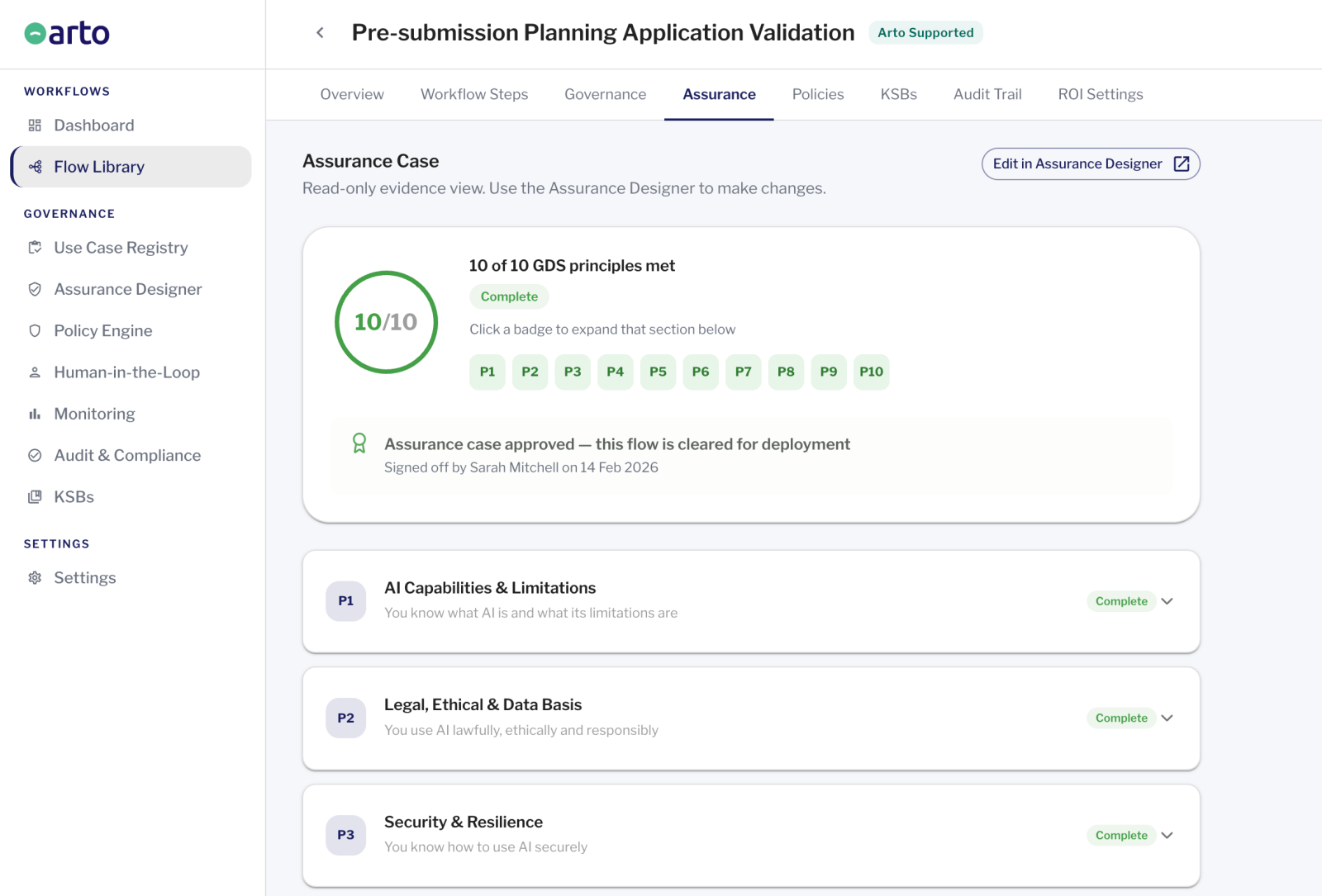
What the Assurance Designer gives you before you go to the DPO
The Assurance Designer in Arto is the governance record for each workflow. For Arto Supported Flows, the majority of sections are pre-populated: the workflow's data scope, its Knowledge, Skills and Behaviours (KSB) profile, its technical safeguards, its Human In The Loop (HITL) configuration and the governance framework it applies are all documented before the organisation's governance lead has done anything.
This is the practical expression of what 'governance built in' means. When a council deploys a change of circumstances workflow, an EHC plan review workflow or a planning validation workflow, the Assurance Designer already contains the technical evidence that the DPO needs to assess the deployment, because that evidence is structural to how the workflow operates, not assembled separately for each deployment.
The governance/IT lead's task is to review the pre-populated sections, supplement them with the council's specific context (the service this workflow operates within, the senior responsible officer, the relevant policies from the Policy Engine), complete the DPIA risk narrative and obtain sign-off. The time required is a fraction of what a manual governance case preparation would take.
What the Assurance Designer package contains
-
Workflow scope documentation:
what the AI does, what data it accesses and what its defined KSB boundary is
-
Data minimisation record:
confirmation that the AI agent's data access is restricted to what is necessary for the defined purpose
-
Technical safeguards documentation:
human oversight gate configuration, compliance check framework, assurance case specification
-
DPIA supplementary evidence:
pre-populated technical sections covering processing activities, data flows, safeguards in place and residual risk categories
-
Lawful basis section:
public task (Article 6(1)(e)) identified as the applicable basis, with space for the council to confirm and document this for their specific context
-
Human oversight record:
HITL gate configuration showing which decisions require officer review and how that review is recorded
-
Policy linkage:
links to the council's relevant AI policies from the Policy Engine (P10 section)
-
Accountability structure:
senior responsible officer assignment, governance lead designation
How to sequence the DPO submission for an Arto deployment
The order in which evidence is assembled and submitted matters. A DPO submission that arrives without the DPIA is returned. One that arrives with the technical evidence but without the senior responsible officer sign-off is delayed. The sequence below is designed to ensure the submission is complete when it reaches the DPO.
Step 1 - Configure and review the Assurance Designer (Governance / IT Lead)
Open the Assurance Designer for the workflow. Review all pre-populated sections: data scope, KSB profile, technical safeguards, HITL configuration. Add the council-specific context: the service area, the senior responsible officer, the relevant policies from the Policy Engine. Identify any sections that require organisational input beyond what is pre-populated.
Arto: Pre-populates the Assurance Designer with the workflow's technical governance record. The governance/IT lead reviews and supplements rather than building from scratch.
Step 2 - Complete the DPIA (Governance / IT Lead + DPO involvement)
Using the pre-populated DPIA supplementary evidence in the Assurance Designer as the foundation, complete the DPIA narrative: document the purpose and necessity of the processing, assess residual risks after the technical safeguards are applied, and identify any additional mitigations required. Where the DPO wants to be involved in the risk assessment, this is the right stage for that input: before the formal submission, not as part of it.
Arto: Provides the technical sections of the DPIA evidence base: processing activities, data flows, safeguards, KSB data minimisation controls, HITL oversight documentation. The risk narrative and residual risk sign-off remain with the organisation.
Step 3 - Run the test execution and obtain the governance certificate (Governance / IT Lead)
Run the workflow in test mode against non-live data. Review the Assurance Designer record and the audit trail produced. This is the primary technical evidence for the DPO submission, demonstrating that the compliance framework is functioning as documented in the Assurance Designer, before any resident data is processed.
Arto: Executes the test run and generates the governance certificate. The certificate is available immediately after the test run and is part of the Assurance Designer record.
Step 4 - Obtain senior responsible officer sign-off (Senior Responsible Officer)
The SRO reviews the completed Assurance Designer record including the DPIA, confirms the lawful basis for processing, and signs off the governance record. This sign-off is the organisational accountability step that precedes the DPO submission. The DPO's role is to advise on compliance. The decision to deploy is the SRO's.
Arto: Documents the SRO sign-off in the Assurance Designer record, creating a permanent attributed record of the accountability decision.
Step 5 - Submit the governance package to the DPO (Governance / IT Lead)
Compile the DPO submission from the Assurance Designer record: the completed workflow scope documentation, the DPIA (with residual risk sign-off), the Assurance Designer record and audit trail from the test run, the data security documentation (ISO 27001, UK hosting, no-training commitment), and the SRO sign-off record. Present this as a complete package — the DPO should be able to answer all eight questions in Section 2 from the materials submitted.
Arto: The Assurance Designer record is the primary source document. Export or share the relevant sections. The governance certificate is attached separately.
Step 6 Activate the workflow for live processing (Governance / IT Lead)
Once DPO sign-off is confirmed, activate the workflow for live data processing. The Assurance Designer record is updated to reflect the approved status. From the first live run, the governance certificate and audit trail are generated on every execution, providing the ongoing governance record the DPO will rely on in any future review.
Arto: Updates the workflow status in the platform. From activation, audit records are generated automatically on every run. No further setup required.
In short: The DPO submission for an Arto Supported Flow is substantially pre-assembled by the Assurance Designer. The organisation's tasks are: completing the DPIA risk narrative, obtaining SRO sign-off and presenting the package. Steps 1 to 4 happen before the DPO submission. Step 5 is the submission. Step 6 follows sign-off.
Questions DPOs commonly ask about AI deployments
Does the AI make decisions automatically, or is a human involved?
Human oversight is enforced at defined decision points in every Arto Supported Flow. The AI produces an output (a triage summary, a calculation, a draft decision) but that output cannot be acted upon without officer review and recorded sign-off. The officer's decision is attributed to them by name with a timestamp. No significant decision is made solely by the AI system.This is relevant to Article 22 of UK GDPR, which applies to solely automated decisions with significant legal effects. Well-designed workflows with genuine human oversight at decision points are not solely automated.
Article 22 and AI decisions explainedWhat happens if the AI produces an incorrect output?
Any workflow execution where the AI output fails a governance check, differs from expected parameters, or is flagged by a plausibility check is paused and routed to the HITL Control Centre for officer review. The officer reviews the output, applies professional judgement and either approves a corrected decision or returns the case. The incorrect output is never automatically acted upon.In the event that an error is identified in a live deployment, for example a systematic issue with a calculation, the workflow can be paused immediately. All existing run records are preserved in the audit trail, providing the complete record needed for any remediation.
Who is accountable for decisions made with this AI system?
Accountability for AI-assisted decisions rests with the officer who reviews the AI output and makes the final determination. That officer is named in the audit trail alongside their decision and the timestamp. The senior responsible officer designated in the Assurance Designer is accountable for the governance of the deployment overall. Neither accountability sits with the AI system or with Arto.
How long is personal data retained by the AI platform?
Data processed through Arto workflows is not retained beyond what is required for the governance audit record. The audit record itself is retained in line with the council's own retention schedule for governance documentation. Input data from workflow processing is not stored in a separate pool or used for any purpose beyond the specific workflow execution.Confirm the council's retention schedule applies to Arto-processed data and document this in the DPIA. The platform's retention position should be included in the records of processing activities.
Where to go from here
The full approval sequence
How DPO sign-off fits into the broader IT security and senior leadership approval process.
Getting AI approvedUK GDPR and AI data processing
The legal obligations around data processing that underpin the DPO assessment: lawful basis, DPIAs and Article 22.
UK GDPR and AIAudit trail and ongoing governance
What the governance documentation looks like after sign-off: the audit trail, assurance case and monitoring.
Audit trail