The three layers of a governed AI workflow
The walkthrough below uses an Arto Supported Flow from revenues and benefits (change of circumstances automation) to show exactly what happens at each step. The same three-layer architecture applies to every Arto Supported Flow.
The workflow layer
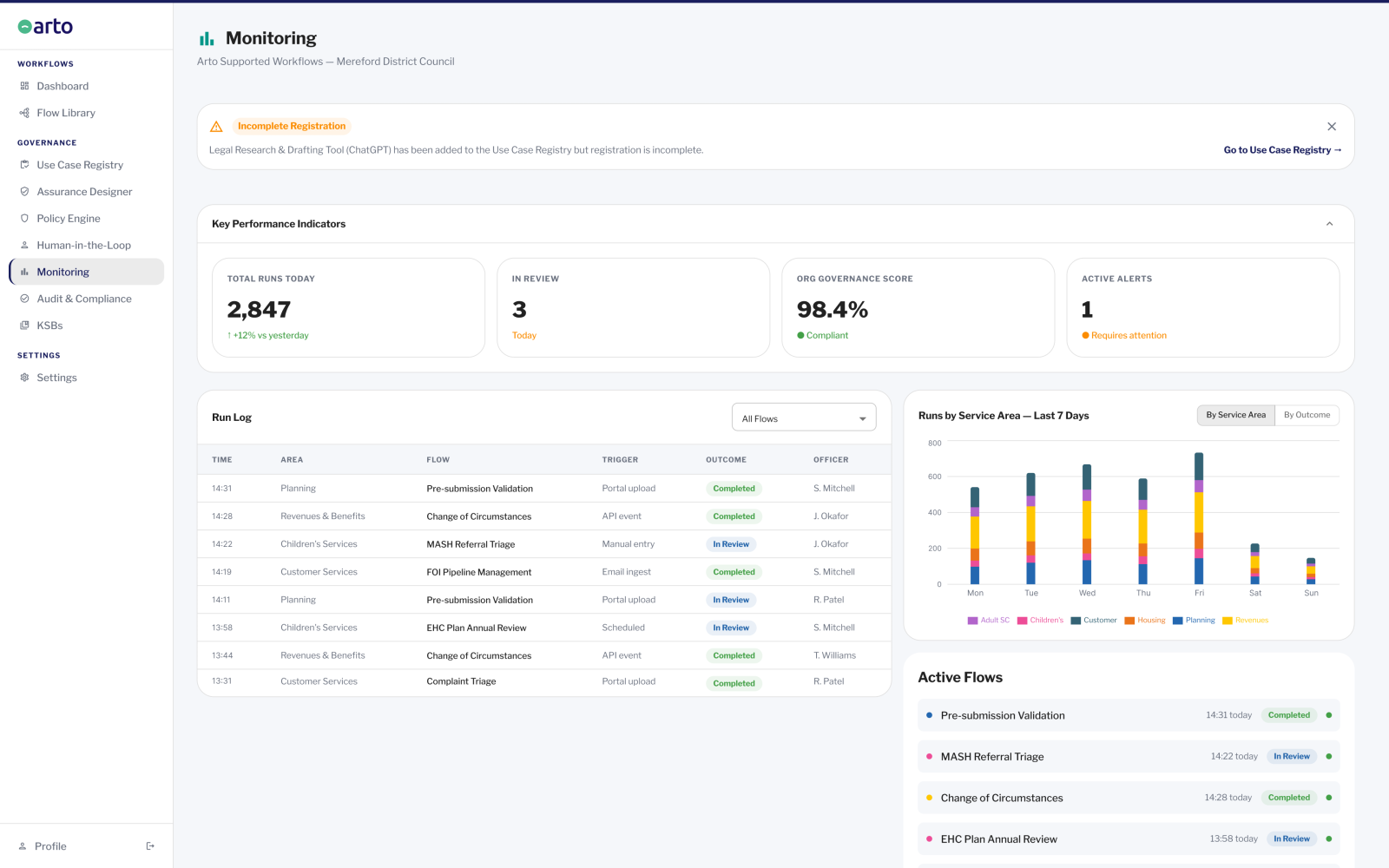
The workflow layer is where the AI agent does the work. It reads inputs, queries connected systems, applies the defined rules and logic, and produces outputs. The workflow layer is what the service lead commissioned: a specific task, executed consistently, at a fraction of the time it takes manually.
In Arto, every workflow is defined by its knowledge, skills and behaviours (KSB) profile, a mapping of exactly what the AI agent is permitted to do and what it is not. The agent cannot act outside the defined KSB boundary. This is not a guardrail added afterwards. It is the definition of the workflow itself.
The governance layer
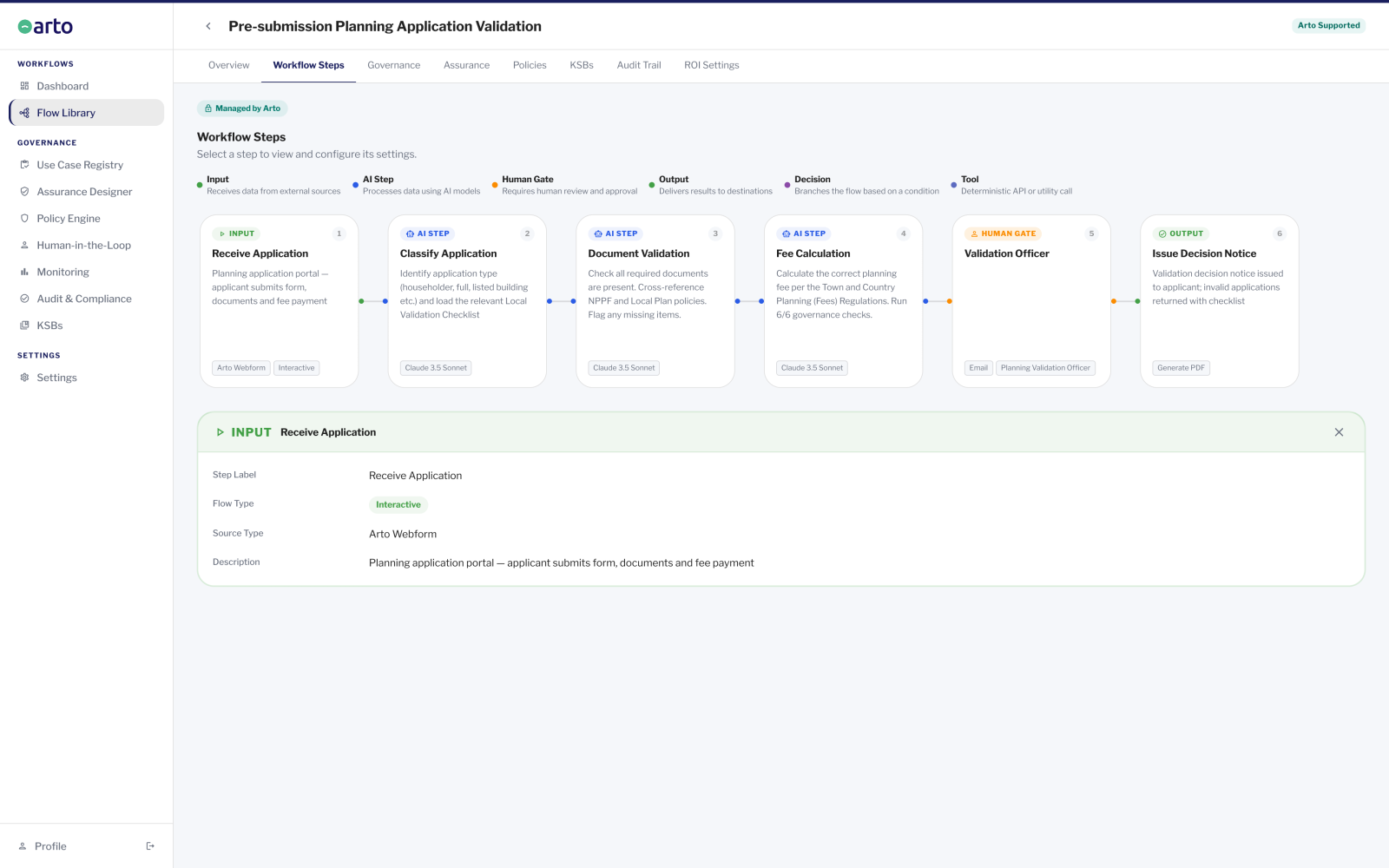
The governance layer runs in parallel with every workflow execution. It enforces the compliance framework, captures the AI reasoning, applies human oversight gates at defined decision points and records everything in the immutable audit trail.
The governance layer is not visible to residents or to the officer doing daily work. It runs automatically, in the background, on every single execution. The officer sees the output of the workflow, the triage summary, the decision letter, the validation report. The governance layer ensures that output is auditable, defensible and compliant.
The management layer
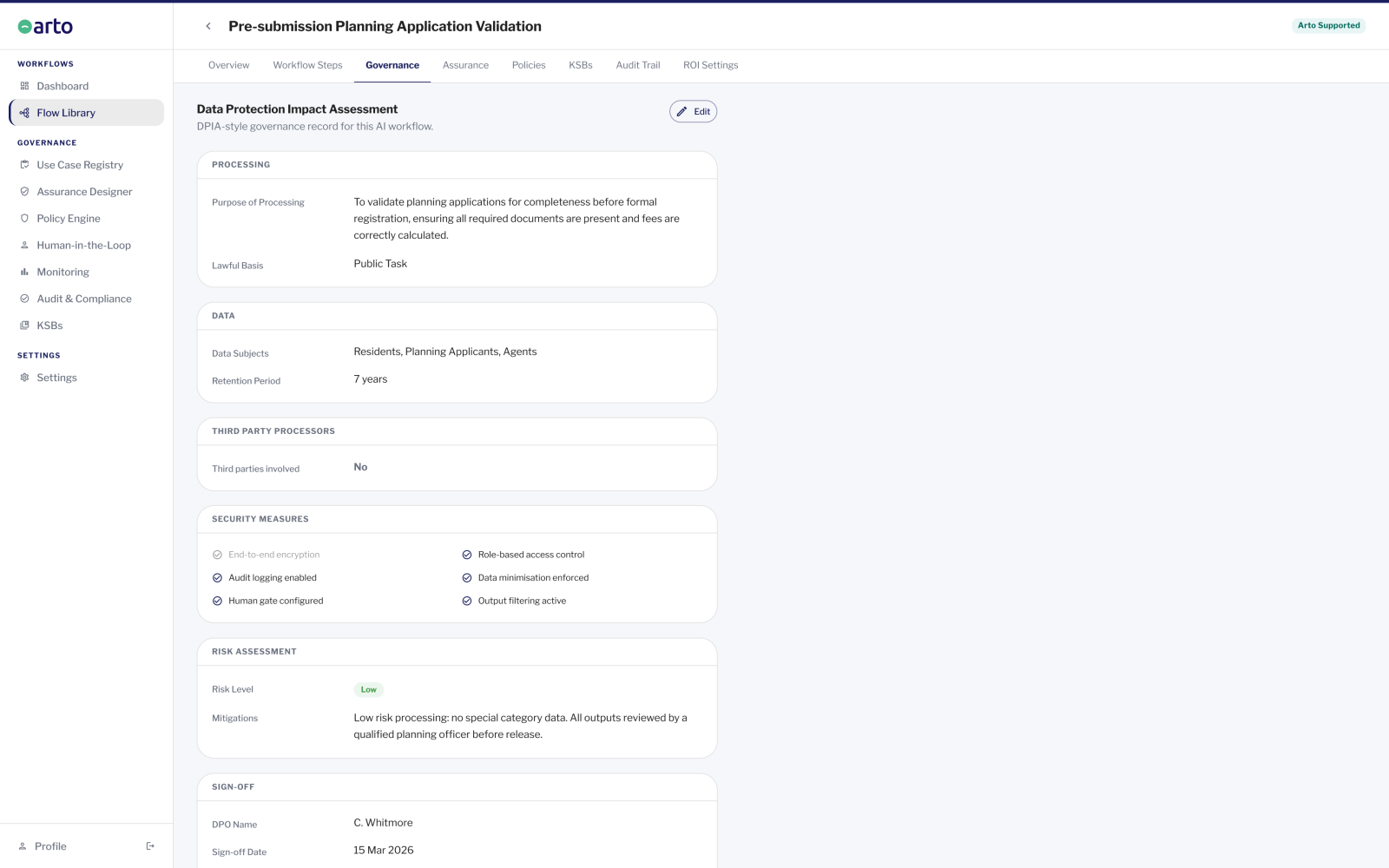
The management layer is what governance leads, administrators and senior managers see. It surfaces workflow performance, governance health, alerts requiring attention and the organisation's overall AI compliance status in real time. It does not perform actions, actions happen in the workflow and governance layers. The management layer provides visibility.
In Arto, the management layer includes the Monitoring dashboard (run volume, outcomes, alerts, organisation governance score), the HITL Control Centre (AI outputs awaiting officer review), and the Use Case Registry (every AI tool and workflow in use across the organisation, including third-party tools).
A governed workflow in action: Change of Circumstances Automation
A typical billing authority processes 400 to 600 changes of circumstances per week. Each currently takes 45 to 90 minutes of officer time. The Arto workflow processes standard cases in under five minutes, end to end, with full governance on every run.
Here is what happens when the workflow runs.
Step 1 - Trigger: notification arrives
The audit log opens. The trigger event is timestamped and recorded: source channel, submission time, notification content hash. The compliance check clock starts.
Governance layer: A resident submits a change of circumstances via the council's online portal. The citizen portal webhook fires and Arto receives the structured data automatically.
Step 2 - Account identification
Data access is logged: which system was queried, what data was retrieved, the legal basis for processing (public task). Data minimisation controls ensure only the fields required for this workflow are accessed. The audit trail records the exact data scope.
Governance layer: Arto extracts identifying details from the notification and queries the back-office R&B system via API (NEC Revenues and Benefits or MRI Revenues and Benefits). The matching account is identified automatically for standard cases. Ambiguous matches are flagged for officer review.
Step 3 - Current liability retrieval
Data retrieval is logged within the audit trail. The workflow is operating within its defined KSB boundary, it has access to revenues and benefits account data for this account and no other data scope.
Governance layer: Arto retrieves the account's current liability, applicable discounts or exemptions, and payment history from the back-office system. No manual lookup required.
Step 4 - Recalculation
The calculation basis is recorded in the audit trail. The specific rules applied, the input values used and the output produced are all captured. If the calculation is ever challenged at tribunal or appeal, the exact calculation is available for evidence.
Governance layer: Arto calculates the new liability or entitlement by applying the relevant legislation, discount rules and income assessment rules to the new circumstances. Standard cases such as address changes, single person discount claims and student exemptions are calculated automatically. Complex cases involving capital thresholds, non-dependant deductions or discretionary elements are flagged for officer review.
Step 5 - Plausibility checks
Each check run is recorded in the audit trail with the result: passed, failed or flagged. This constitutes the documented due diligence that officers would previously have performed manually, now automated and evidenced.
Governance layer: Arto runs automated plausibility checks: the claimed income is cross-referenced against benefit claim history, the new address is validated against the national address gazetteer (UPRN), and the change is cross-referenced against electoral roll data. Anomalies are flagged for officer review.
Step 6 - Exception routing - HITL gate
The HITL gate is the human oversight enforcement point. Every decision in the Control Centre is attributed to a named officer, timestamped and permanently recorded. The officer's decision and the AI output that prompted it are both preserved. Decisions are irreversible once confirmed.
Governance layer: Standard cases proceed automatically. Cases that fail a plausibility check, exceed a complexity threshold or where Arto's calculation differs from the expected range are paused and routed to the HITL Control Centre. A revenues officer is assigned the case, reviews the AI output, applies professional judgement and records their decision before the workflow proceeds.
Step 7 - Output: decision letter and account update
The output is captured in the audit trail: the exact figures used, the template selected, the delivery channel, the timestamp of despatch.
Governance layer: For standard cases: Arto generates the new council tax bill or housing benefit decision letter using the calculated figures, selects the correct template, populates all fields and sends it by the resident's preferred channel. The back-office account is updated via API. The direct debit mandate is adjusted automatically for standard changes.
Step 8 - Performance recording and closure
The sealed audit log is now available for any governance review: ICO inquiry, tribunal evidence, internal audit, scrutiny committee. The organisation governance score on the Monitoring dashboard is updated to reflect this run's compliance result.
Governance layer: The case is closed in the work queue. Arto records the processing time, updates the performance dashboard with case volume, time saved and outcome distribution. The audit log is sealed and becomes immutable.
In short: Every step of this workflow runs simultaneously in all three layers. The officer or resident sees only the output. The governance layer has been running throughout, recording, checking, enforcing and documenting at every point.
What officers see when they work with Arto
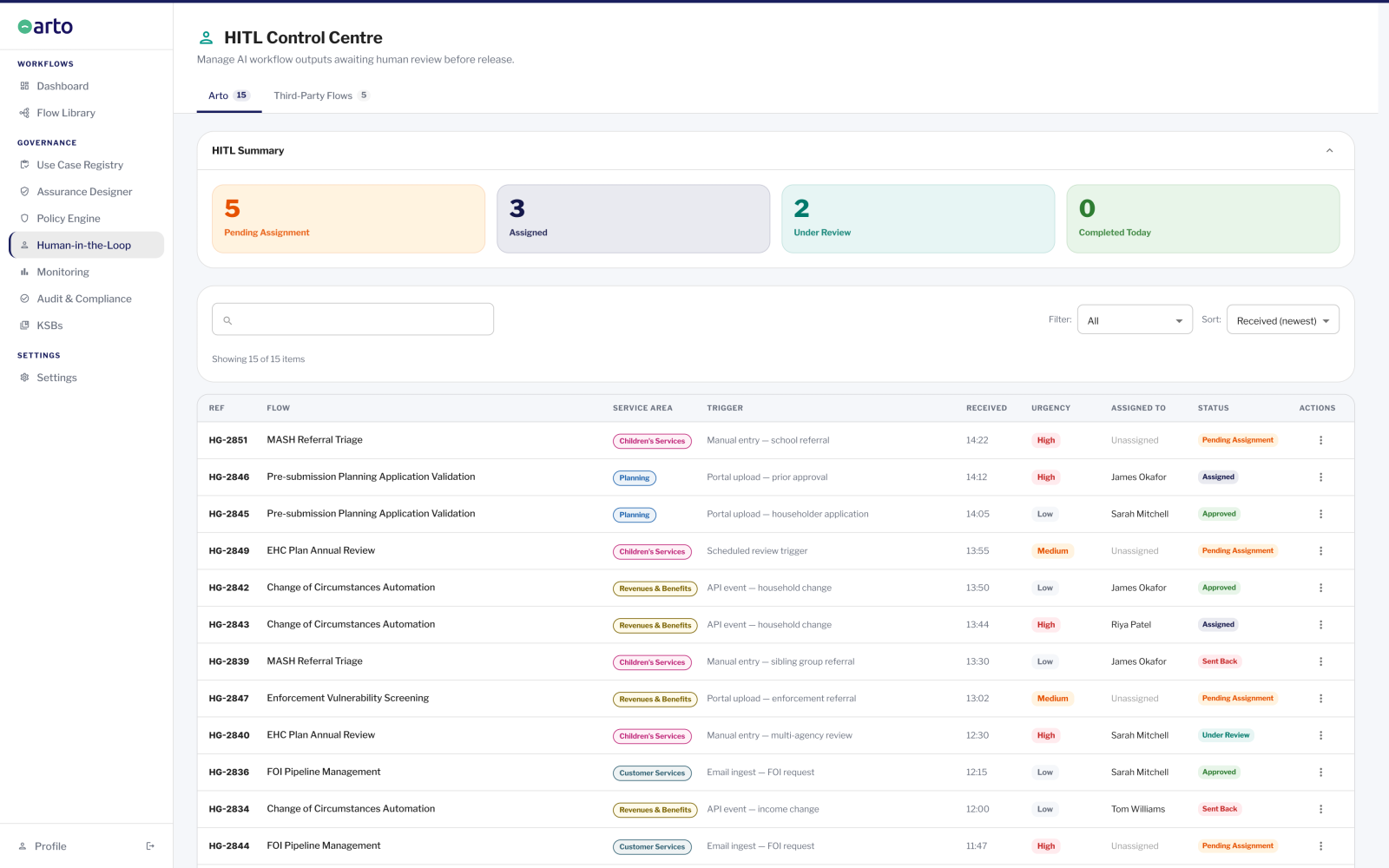
The HITL Control Centre
Who uses it: Revenues officers, SEND coordinators, duty social workers, any officer who reviews and approves AI outputs before they are acted upon. Used daily.
What they do: The officer opens their queue, sees all AI outputs assigned to them awaiting review, opens a case, reads the AI analysis and supporting evidence, applies their professional judgement, and records their decision, approve or send back. The decision requires conscious confirmation. It is irreversible once confirmed.
What is recorded: Officer name, decision (approved or sent back), timestamp, reasoning note if provided, the AI output that was reviewed. Both the AI analysis and the officer decision are permanently preserved in the audit trail.
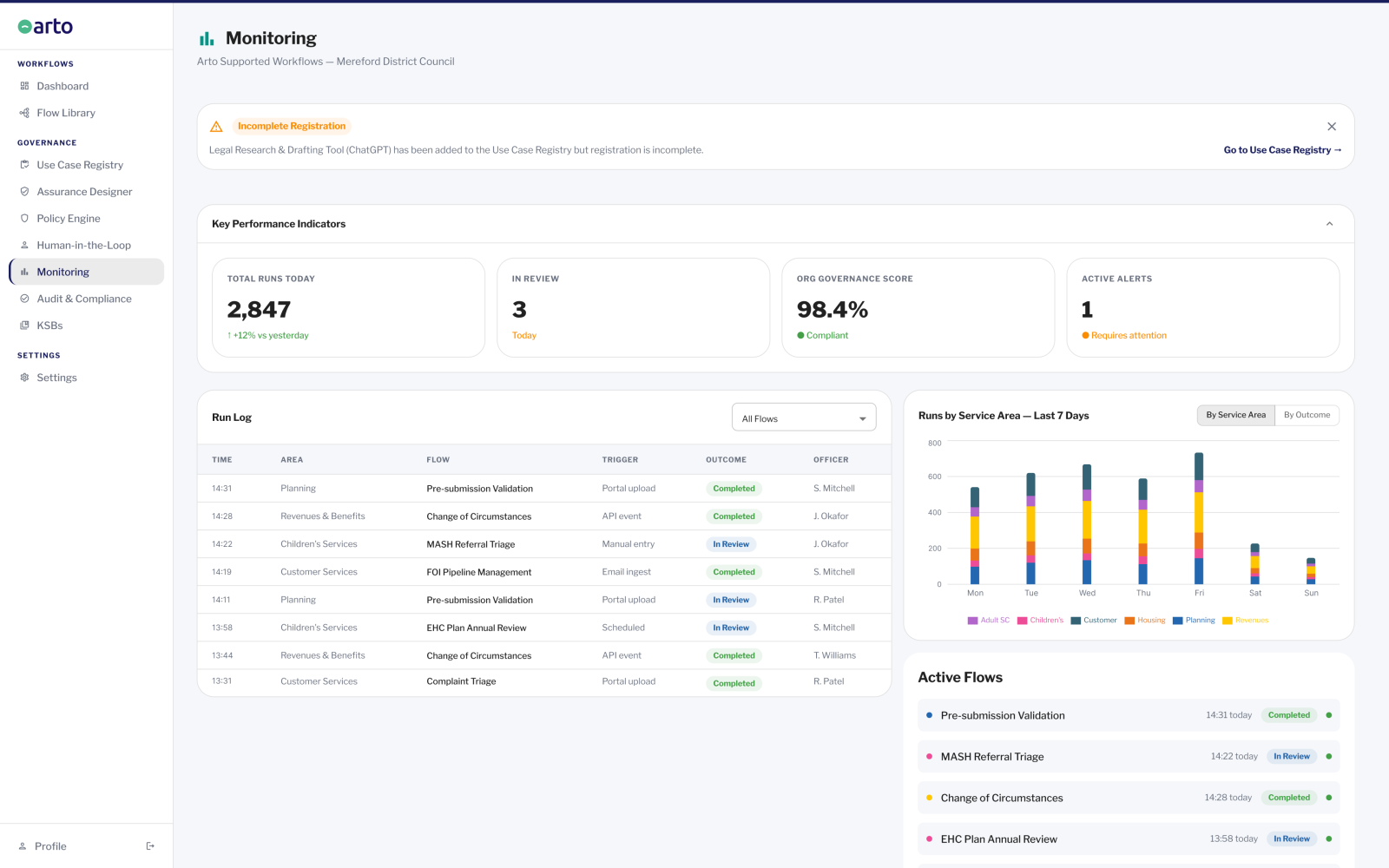
The Monitoring Dashboard
Who uses it: Governance leads, service managers, administrators. Checked daily or weekly.
What they do: The governance lead or manager views the organisation's governance score, workflow run volumes, outcome distribution, active alerts and the seven-day trend chart. If a governance score drops, because an assurance record is incomplete or an alert has not been actioned, they see it here. The dashboard links to the relevant area of the platform for each alert.
What is recorded: Nothing is recorded from the Monitoring dashboard, it is observational. The data it displays is generated by the workflow executions and governance checks in the underlying layers.
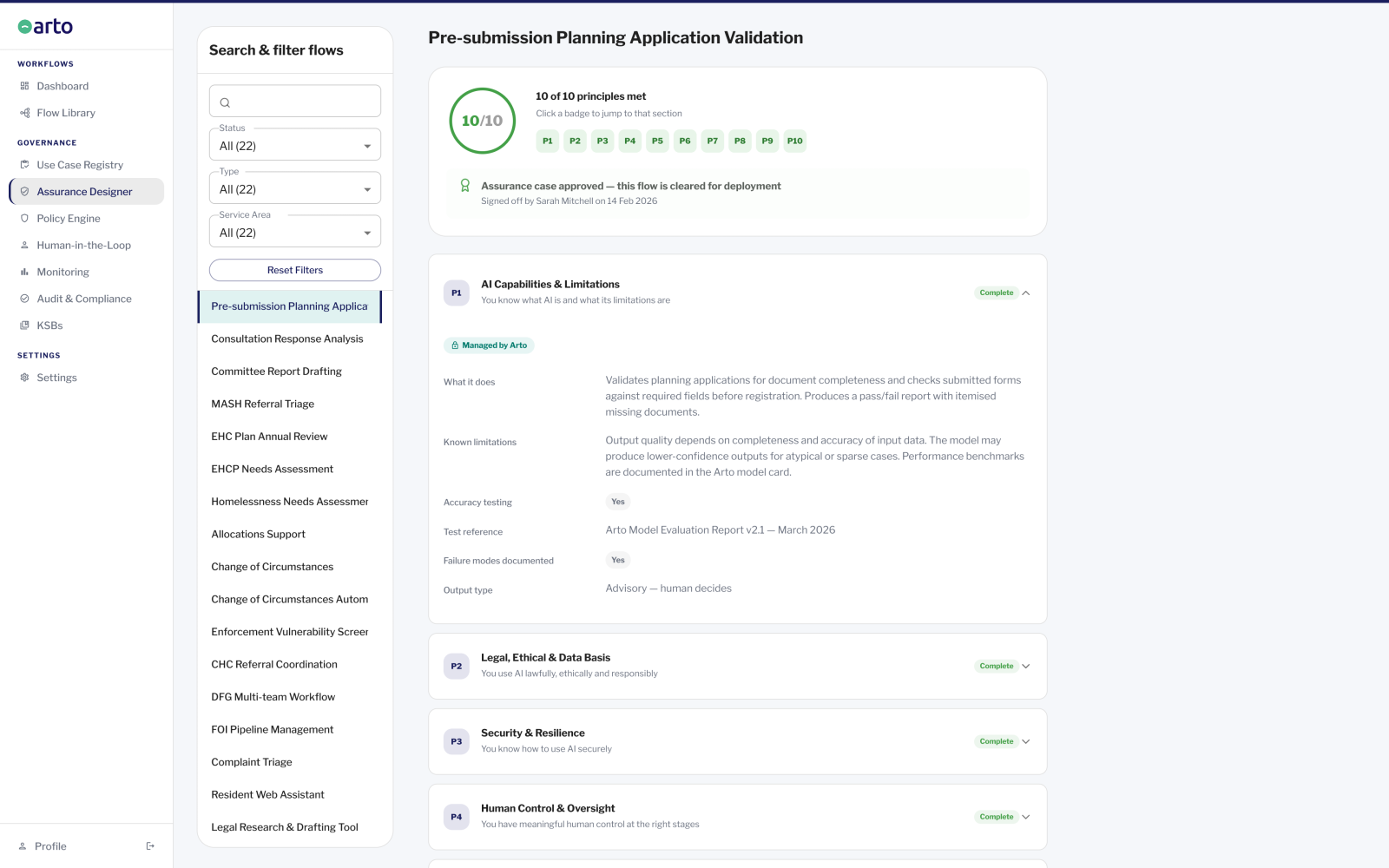
The Assurance Designer
Who uses it: The person responsible for governance of each workflow, typically the information governance lead, the senior responsible officer or the DPO contact. Set up once per workflow.
What they do: The governance lead works through the Assurance Designer sections to complete the evidence base for each workflow's assurance case. For Arto Supported Flows, the majority of sections are pre-populated. The governance lead reviews, supplements where required and links the organisation's AI policies from the Policy Engine. The completed Assurance Designer record is the primary governance documentation for DPO review and IT security assessment.
What is recorded: The completion status of each section is tracked. The organisation governance score on the Monitoring dashboard is derived from Assurance Designer completion across all active flows.
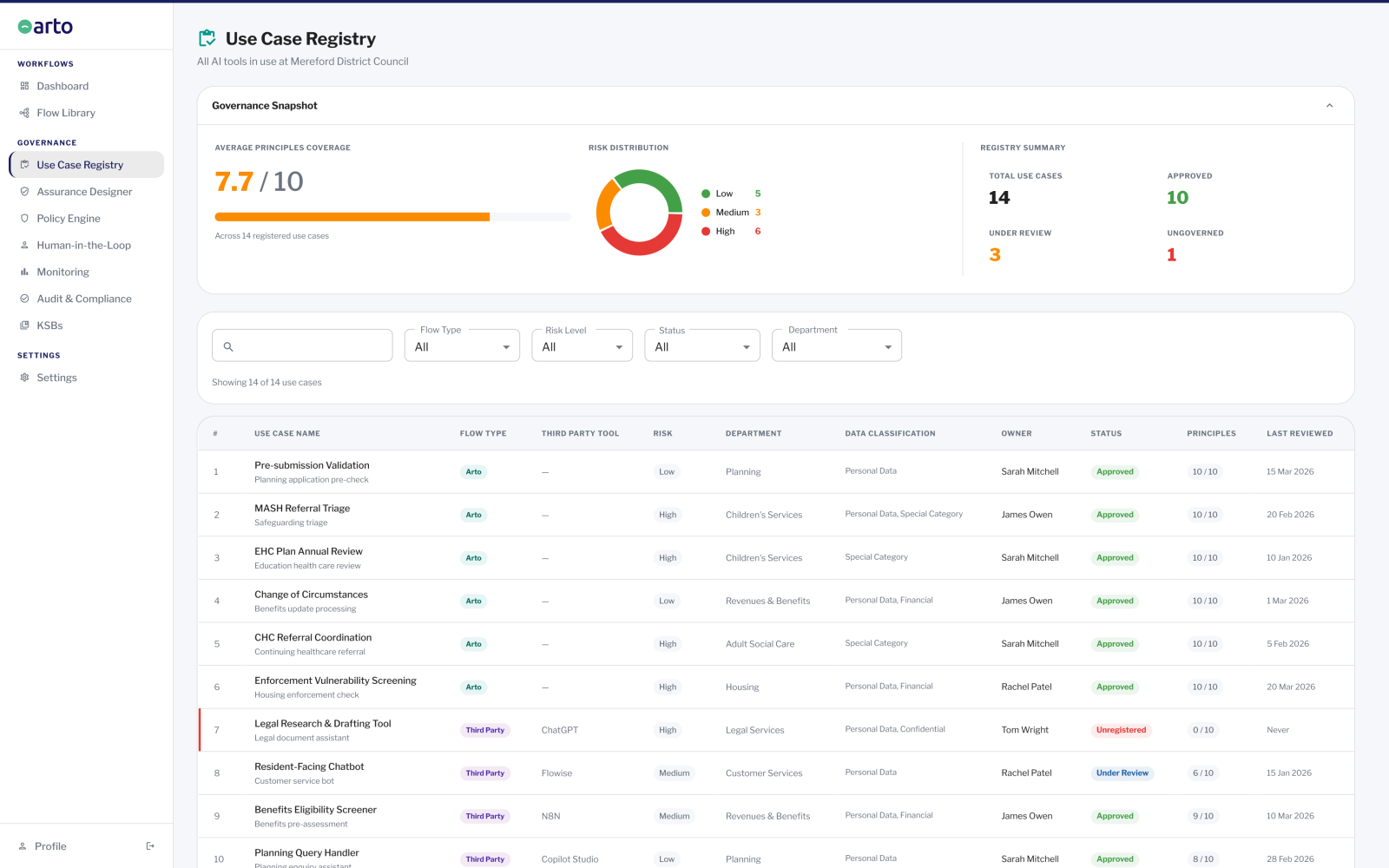
The Use Case Registry
Who uses it: Governance leads and IT leads. Reference view, not daily operational use.
What they do: The governance lead or IT lead views the complete register of every AI tool and workflow in use across the organisation, both Arto Supported Flows and any third-party tools (Copilot Studio, Flowise, N8N) that have been registered. Each entry shows risk level, oversight status and governance completion. This is the organisation's answer to the question: 'Can I see everything AI is doing across our organisation in one place?'
What is recorded: Every flow in the Flow Library, both Arto Supported and third-party, is automatically surfaced in the Use Case Registry. Manual registration is not required for Arto Supported Flows.
What Arto's governance layer produces as evidence
Every workflow run produces a structured set of governance evidence. This is not a report that must be requested or compiled, it is generated automatically at the point of execution and is available immediately.
For the DPO and information governance
- Assurance case records and audit trail showing data accessed, processing scope and legal basis applied.
For IT security
Audit trail showing system connections used, data accessed and access scope.
Assurance case demonstrating alignment to key standards.
For scrutiny committees and senior leadership
ROI dashboard showing time saved, cost reduced and demand deflected per run period.
Organisation governance score from the Monitoring dashboard.
Exportable audit trail for any run.
What happens before a workflow processes live data
Before any Arto Supported Flow processes live data, it runs through a test execution using non-live data. The test run exercises the full workflow — trigger, data retrieval, processing, compliance checks, HITL gate, output generation, against representative sample data.
The test run produces the same governance certificate and audit trail as a live run. The governance documentation produced in the test run is the primary evidence submitted to the DPO and IT security team for the approval submission: it demonstrates that the compliance framework is functioning as specified before any resident data is processed.
Once the test run documentation has been reviewed and approval obtained, the workflow is activated for live processing. The governance certificate and audit trail from the test run are preserved permanently as part of the deployment record.
What to do next
See the workflow for your service area
Browse the full library of Arto Supported Flows across planning, children's services, revenues and benefits and more.
Workflow libraryUnderstand the governance architecture
See how the four compliance frameworks are embedded into the platform and what the governance infrastructure produces.
The AI governance foundationSee this in your context
Speak with the Arto team to walk through how a specific workflow would run in your service area and what the governance documentation looks like.
Book a governance review