Does Arto work with our existing systems?
Yes. Arto Supported Flows are built to connect with the specific back-office systems UK public sector service areas already use. A planning workflow connects to the Planning Portal API. A revenues and benefits workflow connects to NEC or MRI back-office systems. A children's services workflow connects to systems such as Liquidlogic, Mosaic, or Civica ECLIPSE.
For Arto Supported Flows, the system integration is part of how the workflow is built. You do not configure it from scratch. The integration work has already been done for the specific systems each workflow targets.
Can Arto govern AI tools we are already running?
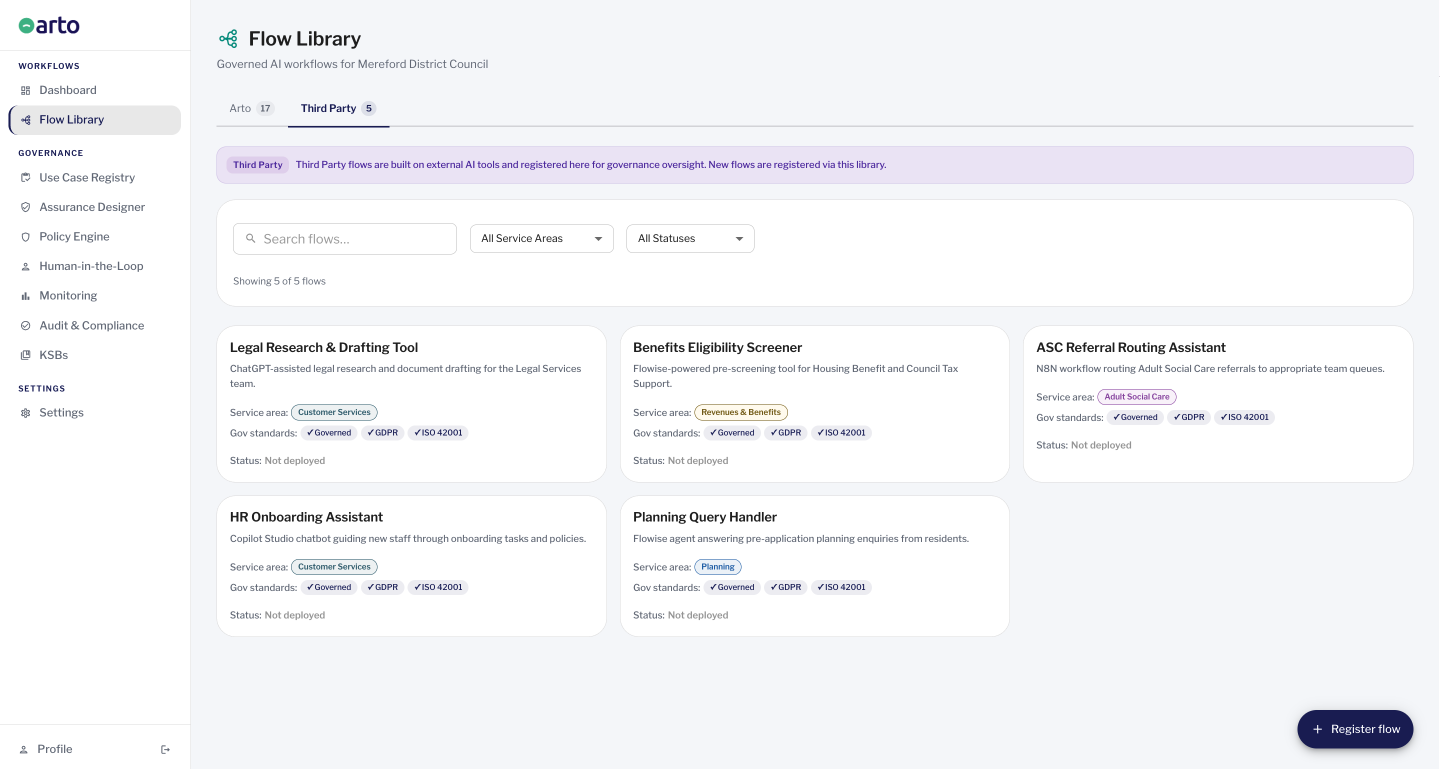
Yes. AI tools your organisation is already using (including Microsoft Copilot Studio, Flowise, N8N, and other platforms) can be registered in Arto as Third Party Flows. Once registered, they appear in the Use Case Registry alongside Arto Supported Flows, giving you a single view of every AI tool in use across the organisation. The HITL Control Centre's second tab shows which third-party flows have human oversight configured.
Arto does not replace third-party AI tools. It does not run them or modify how they operate. It registers them, tracks their governance status, and brings them into the organisation's AI accountability framework. For organisations worried about shadow AI (AI tools being used without IT or compliance teams knowing), the Use Case Registry is how you see everything.
In short: Arto connects to back-office systems so that workflows can run. It governs third-party AI tools without replacing them. These are two different integration models addressing two different concerns.
Which back-office systems Arto connects to
Arto Supported Flows are built around the specific back-office systems that UK public sector service areas use. The connection to those systems is part of the workflow design. It is not a general API framework that organisations configure themselves. The table below shows which systems each service area's workflow connects to.
System | Arto workflows using this system | Connection method |
Planning Portal | Planning validation, Consultation analysis | Planning Portal submission API (publicly accessible). No Idox integration required. |
NEC Revenues & Benefits | Change of circumstances automation, Enforcement vulnerability screening | NEC REST API |
MRI Revenues & Benefits | Change of circumstances automation, Enforcement vulnerability screening | MRI MIX API / IEG4 layer |
Liquidlogic Children's (LCS) | MASH referral triage | Liquidlogic CreateContact API (production). File/email intake for POC. |
Mosaic (Access Group) | MASH referral triage | Access Group API |
Civica ECLIPSE | MASH referral triage | Civica API |
MRI Education (formerly Capita One Education) / Access Synergy | EHC plan annual review | MRI MIX API or Synergy API (production). File-based ETL / spreadsheet import for POC. |
DWP / HMRC data matching | Change of circumstances automation | DWP/HMRC data matching trigger where applicable |
Governing third-party AI tools without replacing them
Organisations deploying AI do not start from zero. Most already have AI tools in use: Microsoft Copilot, Flowise-built agents, N8N automations, or other platforms. The question for governance and IT teams is not 'how do we govern AI we are building from scratch' but 'how do we govern AI that is already running across the organisation.'
Arto addresses this through the Third Party Flow model. Any AI tool or workflow your organisation is using can be registered in the Arto Flow Library as a Third Party Flow. Once registered, it appears in the Use Case Registry alongside Arto Supported Flows, giving governance leads, IT leads, and the monitoring officer a complete picture of every AI tool in the organisation's estate, regardless of who built it or where it runs.
Microsoft Copilot Studio Microsoft / AI assistant Register Copilot Studio workflows as Third Party Flows. They appear in the Use Case Registry. HITL Tab 2 shows whether human oversight steps are configured. Arto does not modify how Copilot runs. Governance level: Use Case Registry visibility + HITL oversight status | Flowise Open-source LLM orchestration Flowise-built AI agents can be registered as Third Party Flows. Governance is configured manually within Arto. Arto does not run Flowise. It governs and registers it. Governance level: Use Case Registry + manual governance configuration | N8N Workflow automation N8N automations involving AI can be registered as Third Party Flows. Same model as Flowise: governance configured manually, Arto provides the oversight register. Governance level: Use Case Registry + manual governance configuration | Other AI tools Any platform Any AI tool or workflow your organisation uses, whether a commercial platform, a bespoke model, or another automation tool, can be registered as a Third Party Flow. Governance level: Use Case Registry visibility + manual governance configuration |
What Third Party Flow registration provides
- Appearance in the Use Case Registry alongside Arto Supported Flows, giving one view of every AI tool across the organisation
- Risk level and oversight status visible to governance leads, IT leads, and monitoring officers
- HITL Control Centre shows which third-party flows have human-in-the-loop steps configured (read-only register, not a management queue)
- Manual governance configuration within Arto: the organisation configures governance rather than inheriting pre-populated records
What Third Party Flow registration does not provide
- Automatic governance inheritance: no pre-populated assurance records, no auto-generated audit logs, no automatic KSB linking
- Run capability inside Arto: the tool continues to run in its own environment
- Compliance monitoring at run level: Arto cannot monitor individual executions of third-party tools
Shadow AI: what it is and what Arto does about it
Shadow AI is AI being used in an organisation that IT and governance teams do not know about: a ChatGPT wrapper adopted by one team, a Copilot Studio agent deployed by a service lead, an N8N automation handling resident data. None of it is in the procurement record, the DPIA register, or visible to the monitoring officer.
The Use Case Registry in Arto is the mechanism for bringing shadow AI into view. Every AI tool and workflow registered in Arto appears in the registry, showing what is in use, which service areas it touches, what risk level has been assessed, and whether human oversight is configured.
The registry does not automatically discover tools being used outside Arto. Addressing shadow AI fully requires the registry combined with an organisational policy requiring all AI deployments to be registered. Arto provides the structure; the organisation provides the policy.
Arto is AI-agnostic
Arto does not require organisations to use a specific AI model or LLM provider. The platform is designed to work with whatever AI models and data sources meet the organisation's requirements, whether that is a commercial LLM, an open-source model, or a specialist model trained on public sector data.
The governance layer that Arto provides (the compliance checks, the audit trail, the human oversight gates, the KSB scope enforcement) applies regardless of which AI model is running the workflow. The model can be swapped or updated; the governance architecture remains constant. This means organisations are not locked into a vendor relationship that combines the AI capability and the governance layer in a way that makes either difficult to change.