The distinction matters for public sector organisations specifically because the obligations of the public sector go beyond the obligations of a commercial Copilot user. Every AI-assisted decision made in a council, NHS trust or government department is subject to public accountability, scrutiny and legal challenge. The organisation, not the tool, carries the responsibility for every decision made with AI assistance.
Arto is the governance layer that makes that responsibility manageable. It provides the audit infrastructure, the compliance framework, the human oversight controls and the policy enforcement that UK public sector AI deployments require — whether those deployments are running natively on Arto or through third-party tools that the organisation already uses.
What Microsoft Copilot is designed to do
Microsoft Copilot is an AI assistant embedded in Microsoft 365. It helps individuals and teams work more efficiently: drafting documents, summarising emails, analysing spreadsheets, generating content, and supporting day-to-day productivity tasks within the Microsoft ecosystem.
For public sector organisations, Copilot offers genuine productivity value. Officers who use Word, Outlook, Teams, Excel and SharePoint daily can use Copilot to reduce time spent on routine drafting and information retrieval. Microsoft has invested significantly in making Copilot available to public sector organisations and has made commitments regarding data residency and processing within the Microsoft commercial cloud.
Copilot is not, and does not claim to be, an AI governance platform. It does not maintain an immutable, exportable audit trail of every AI-assisted decision. It does not enforce human-in-the-loop approval gates for decisions that require officer sign-off. It does not provide a pre-populated assurance case aligned to the GDS AI Playbook principles. It does not provide governance controls designed and built to align with ISO 27001, ISO 42001 and UK GDPR.
These are not gaps in Copilot. They are outside its design scope. Copilot is a productivity tool. Governance of AI use across the organisation is a separate requirement that Copilot's architecture was not designed to meet.
What Arto is designed to do
Arto is an AI governance and workflow platform built for, and with, the UK public sector. It is not a general-purpose productivity tool. It is governance infrastructure, the operational layer that makes it possible for a public sector organisation to deploy AI safely, at scale, across multiple service areas, with the accountability and auditability that public sector obligations require.
The platform is organised around three areas, workflows, governance and integrations.
Workflows
Arto provides a library of pre-built, governed AI workflows designed specifically for public sector service areas. These Arto Supported Flows arrive with governance built in: automatically linked knowledge, skills and behaviours profiles, pre-populated assurance records, auto-generated audit logs and the full compliance framework applied from the moment the workflow runs. Organisations can also build their own workflows within the platform.
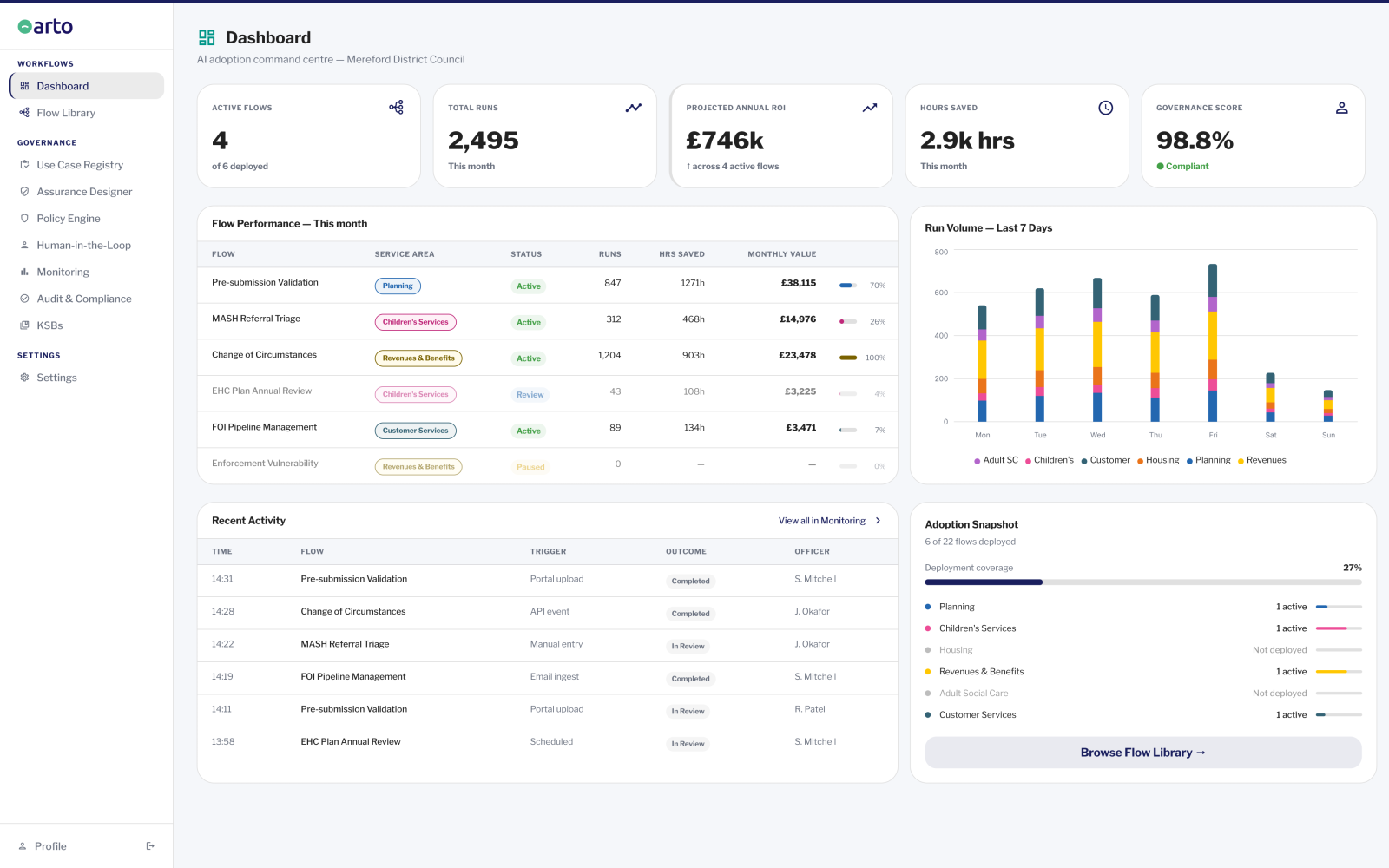
Current Arto Supported Flows include workflows across planning and development, children's services (SEND and MASH safeguarding), revenues and benefits, housing, adult social care and contact centre demand management.
Governance
The governance infrastructure in Arto operates at the platform level, not the workflow level. Every workflow inherits the full compliance framework automatically. The governance architecture includes the following components.
- The HITL Control Centre manages every AI-generated output that requires human approval before it is acted upon. For Arto Supported Flows, the Control Centre provides a full management queue with assignment, review, approve and send-back actions. Every decision is attributed to a named officer, timestamped and permanently recorded. For third-party AI tools including Copilot Studio, the Control Centre provides a register of which tools have human-in-the-loop steps configured — giving governance leads visibility of the entire AI estate.
- The Monitoring Dashboard gives governance leads and administrators a real-time view of workflow performance across the organisation. It surfaces run volume, outcome distribution, active governance alerts and the organisation's overall governance score derived from Assurance Designer completion across all active flows.
- The Use Case Registry is the organisation's central record of every AI tool and workflow in use — both Arto Supported Flows and third-party tools including Microsoft Copilot Studio, Flowise and N8N. It provides a governance and compliance snapshot: who is using what, at what risk level and whether appropriate oversight is in place.
- The Policy Engine is a register of AI governance policies relevant to the organisation's workflows. Policies are linked to individual flows in the Assurance Designer so that assurance evidence can reference them. The Policy Engine provides visibility of which policies apply to which flows.
- The Assurance Designer and audit infrastructure maintain a complete, immutable record of every workflow execution: what triggered it, what data was accessed, what the AI agent did, what human oversight gates were passed, who provided sign-off and what output was produced. This record is exportable for ICO review, legal challenge, internal audit or scrutiny committee.
Integrations
Arto connects to the data sources and back-office systems that UK public sector organisations already use. Supported back-office systems include planning systems (Planning Portal API), children's services systems (Liquidlogic, Mosaic, MRI Education, Access Synergy), revenues and benefits systems (NEC Revenues and Benefits, MRI Revenues and Benefits), and workflow tools (Flowise, N8N). The platform is designed to operate alongside existing tools, including Microsoft platforms, rather than replace them.
How Arto and Microsoft Copilot compare across key dimensions
Dimension | Arto | Microsoft Copilot |
Primary purpose | AI governance infrastructure and workflow platform for UK public sector organisations | AI productivity assistant embedded in Microsoft 365 for individuals and teams |
Built for | UK public sector exclusively. Every workflow, compliance standard and governance framework is designed for public sector obligations. | Commercial and enterprise organisations. Public sector use is supported within the Microsoft commercial cloud. |
Governance framework | UK GDPR, WCAG 2.2, ISO 42001, OECD AI Principles and UK Government AI Playbook embedded at platform level. Every workflow inherits compliance automatically. | Microsoft 365 compliance and data governance tools available. Public sector-specific AI governance frameworks not embedded at workflow level. |
Audit trail | Immutable, exportable audit record of every workflow execution: trigger, data accessed, AI agent actions, human oversight gates, officer sign-off, output produced. Available immediately for ICO, legal or audit review. | Microsoft 365 audit logs available for administrator review. Workflow-level audit trail for individual AI-assisted decisions not generated automatically. |
Human-in-the-loop | HITL Control Centre enforces human approval gates at defined decision points. Every decision attributed to a named officer, timestamped and permanently recorded. Assignment is explicit and auditable. | Human review is possible within Microsoft 365 workflows. Structured enforcement of approval gates with auditable officer attribution at the decision level is not a native Copilot feature. |
Third-party AI governance | Use Case Registry and HITL Control Centre Tab 2 provide visibility and oversight of third-party AI tools including Copilot Studio, Flowise and N8N running outside Arto. | Copilot operates within the Microsoft ecosystem. Governance of non-Microsoft AI tools is outside its scope. |
Workflow specificity | Pre-built Arto Supported Flows for specific public sector service areas: planning validation, EHC plan review, MASH referral triage, change of circumstances automation, enforcement vulnerability screening and others. | General-purpose AI assistance across Microsoft 365 applications. Service area-specific workflows require configuration by the organisation. |
Compliance documentation | Governance controls aligned to ISO 27001, ISO 42001 and UK GDPR. Pre-populated assurance case aligned to the 10 GDS AI Playbook principles. Assurance Designer maintains evidence base for DPIA, IT security and information governance approvals. | Microsoft compliance centre provides organisation-level compliance documentation. Workflow-level compliance evidence for individual AI deployments not auto-generated. |
Organisation governance score | Monitoring dashboard derives an organisation-wide governance score from Assurance Designer completion across all active flows — giving leadership a single view of AI governance health. | Microsoft Secure Score and Compliance Score available for M365 environment. AI workflow governance health score not a native feature. |
Data residency | Data processed through Arto never leaves the UK. Hosted on AWS London. Data never used to train AI models. ISO 27001 certified. | Microsoft has made UK data residency commitments for public sector customers within the Microsoft commercial cloud. Confirm current commitments with Microsoft directly. |
Public sector workflow library | Growing library of Arto Supported Flows maintained and published by Arto, built on 20 years of UK public sector experience across 120+ organisations. | Microsoft provides Copilot scenario templates. Public sector-specific governed workflow library not provided. |
How Arto and Microsoft Copilot work together in a public sector organisation
Most public sector organisations that deploy Arto are already using Microsoft tools, including Copilot or Copilot Studio. Arto is designed to work alongside them, not replace them.
The relationship works at two levels.
Level 1: Arto governs its own workflows independently of Copilot
For the AI workflows that Arto runs natively, planning validation, EHC plan review orchestration, MASH referral triage, change of circumstances automation, enforcement vulnerability screening and others, Arto provides the full governance infrastructure: compliance checks on every run, governance certificate, HITL Control Centre, Assurance Designer evidence and audit trail. These workflows operate entirely within Arto's governance framework and do not interact with Copilot.
Level 2: Arto provides governance visibility of Copilot and other third-party tools
Where an organisation uses Copilot Studio to build AI workflows, or uses other third-party AI tools, Arto's Use Case Registry automatically surfaces those tools as part of the organisation's AI estate. The HITL Control Centre's second tab — the Third-Party Flows register — gives governance leads a read-only view of which third-party tools have human-in-the-loop steps configured, and which do not.
This means a governance lead or DPO using Arto has a single view of all AI in use across the organisation: Arto Supported Flows with full governance detail, and third-party tools including Copilot Studio registered in the Use Case Registry with their risk level and oversight status.
The governance burden for third-party tools remains with the organisation. Arto does not run those workflows and cannot generate audit trails for them at the individual decision level. What Arto provides is visibility and a structured register — so that nothing is running without the governance team's knowledge.
What Arto delivers that a productivity tool is not designed to deliver
Contact centre
Demand management workflow28% reduction in contact centre demand within three months of deployment
Planning
Pre-submission validation workflow30-45 minutes of officer time saved per invalid application. Approximately 30% of applications nationally are invalid on first submission.
Children's services
EHC Plan annual review orchestrationFrom approximately 36% on-time statutory reviews to near 100% — without adding headcount. Audit trail for every review step for Ofsted and Ombudsman.
Children's services
MASH referral triageStructured AI triage summary for every referral. Consistent threshold framework application. 20-40 minutes of triage analysis time reduced. Audit trail demonstrating consistent decision-making for Ofsted.
Revenues and benefits
Change of circumstances automation45-90 minutes per standard change reduced to under 5 minutes. 70-80% reduction in manual processing volume for standard cases.
Revenues and benefits
Enforcement vulnerability screeningEvery household in the enforcement queue screened against vulnerability indicators before referral. Reduction in Ombudsman complaints and compensation payments (GBP 500-2,000 per upheld case).