The AI your governance team cannot currently see
Most councils and public sector organisations are already using more AI than their governance teams know about. Some of that AI is the platforms IT has approved and procured. The rest, sometimes called shadow AI, is being used by service teams, individual officers, and departments without governance review, data protection assessment, or IT security sign-off.
The tools vary: consumer AI assistants used to draft documents, Microsoft Copilot Studio workflows built by individual teams without central oversight, third-party AI platforms adopted for specific service areas without a formal procurement or data protection assessment, and AI features embedded in software that was not originally procured as an AI tool.
The risk is consistent: resident data processed through systems the DPO has not assessed, AI outputs influencing decisions without an accountability record, and legal exposure if something goes wrong that the governance team cannot account for.
AI in use without oversight | The governance risk | What Arto's governance hub provides |
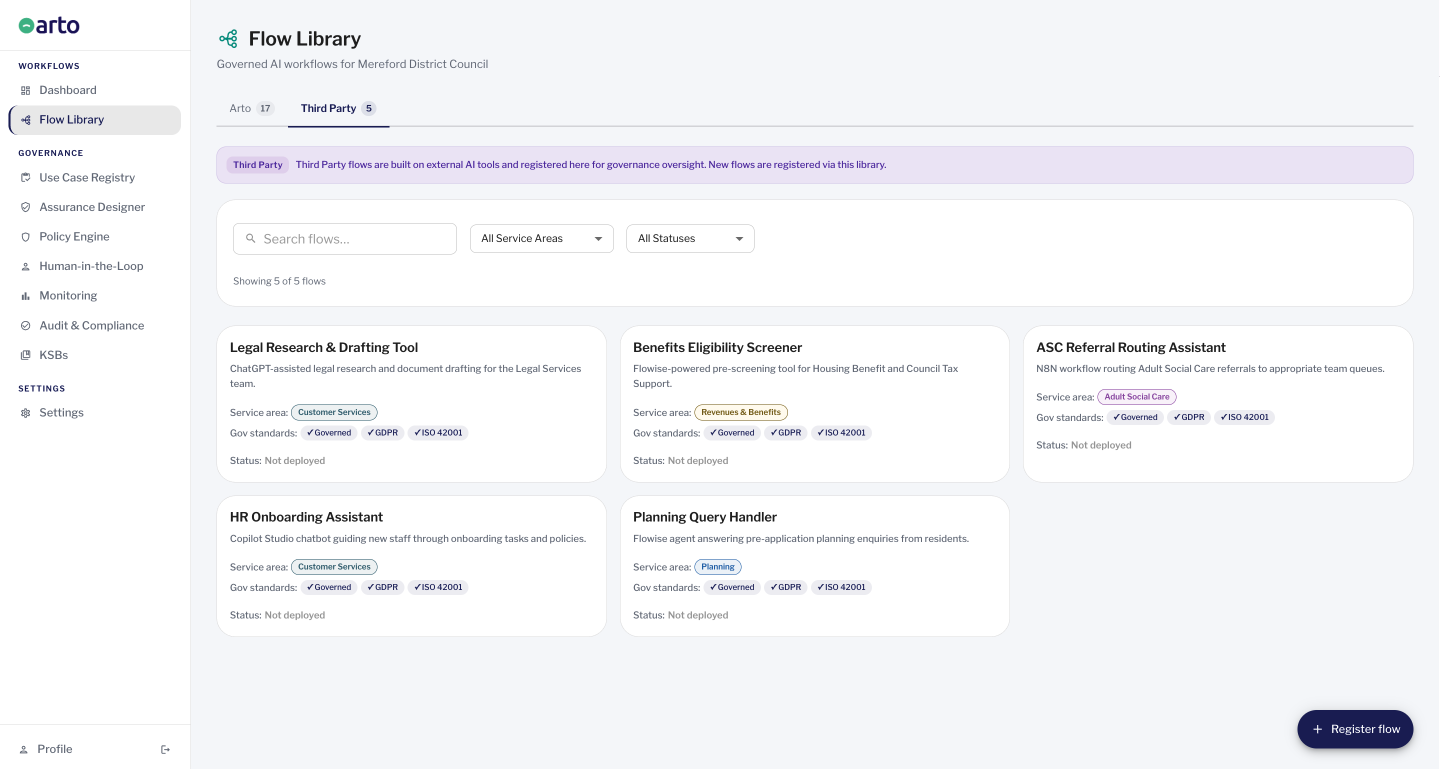
Third-party AI platforms adopted by service teams | No data protection assessment. Resident data processed under unknown terms. No audit trail. No DPIA. | Use Case Registry surfaces every registered third-party flow. HITL Tab 2 shows which have oversight configured. |
Copilot Studio workflows built by individual departments | No central IT oversight. No governance record. No way to know what data is being processed or how. | Copilot Studio flows can be registered in the Flow Library and surfaced in the Use Case Registry alongside Arto Supported Flows. |
Consumer AI tools (ChatGPT, Gemini, etc.) used by staff | Potential processing of personal data through non-compliant channels. No accountability record. | Policy Engine can be used to link the organisation's AI acceptable use policy to the governance record. The Use Case Registry shows registered tools. |
AI features embedded in existing software | Software procured for one purpose has AI features activated without governance review. | Third-party flows can be registered in Arto to bring them into the governance framework, even if the organisation did not initially procure them as AI tools. |
In short: The governance hub does not prevent staff from using unauthorised AI. It gives the governance team the visibility to know what is running, which of it has appropriate oversight configured, and where the gaps are.
What the governance hub consists of
The Arto governance hub is not a single dashboard. It is four integrated components that together give governance leads, IT teams and DPOs the complete picture of AI across the organisation.
Each component answers a different question:
Monitoring dashboard
The question it answers: How are Arto's AI workflows performing and what is the organisation's governance health?
What it shows: Run volume across Arto Supported Flows by service area and outcome. Active governance alerts requiring attention. The organisation's governance score, derived from Assurance Designer completion across all active Arto Supported Flows. A 7-day volume trend chart. A timestamped run log of recent individual workflow executions.
Scope boundary: Monitoring covers Arto Supported Workflows only. Third-party tools (including Copilot Studio, Flowise and N8N) run outside Arto and cannot be monitored at run level through this component. Third-party governance visibility is provided by the Use Case Registry and HITL Control Centre.
Use Case Registry
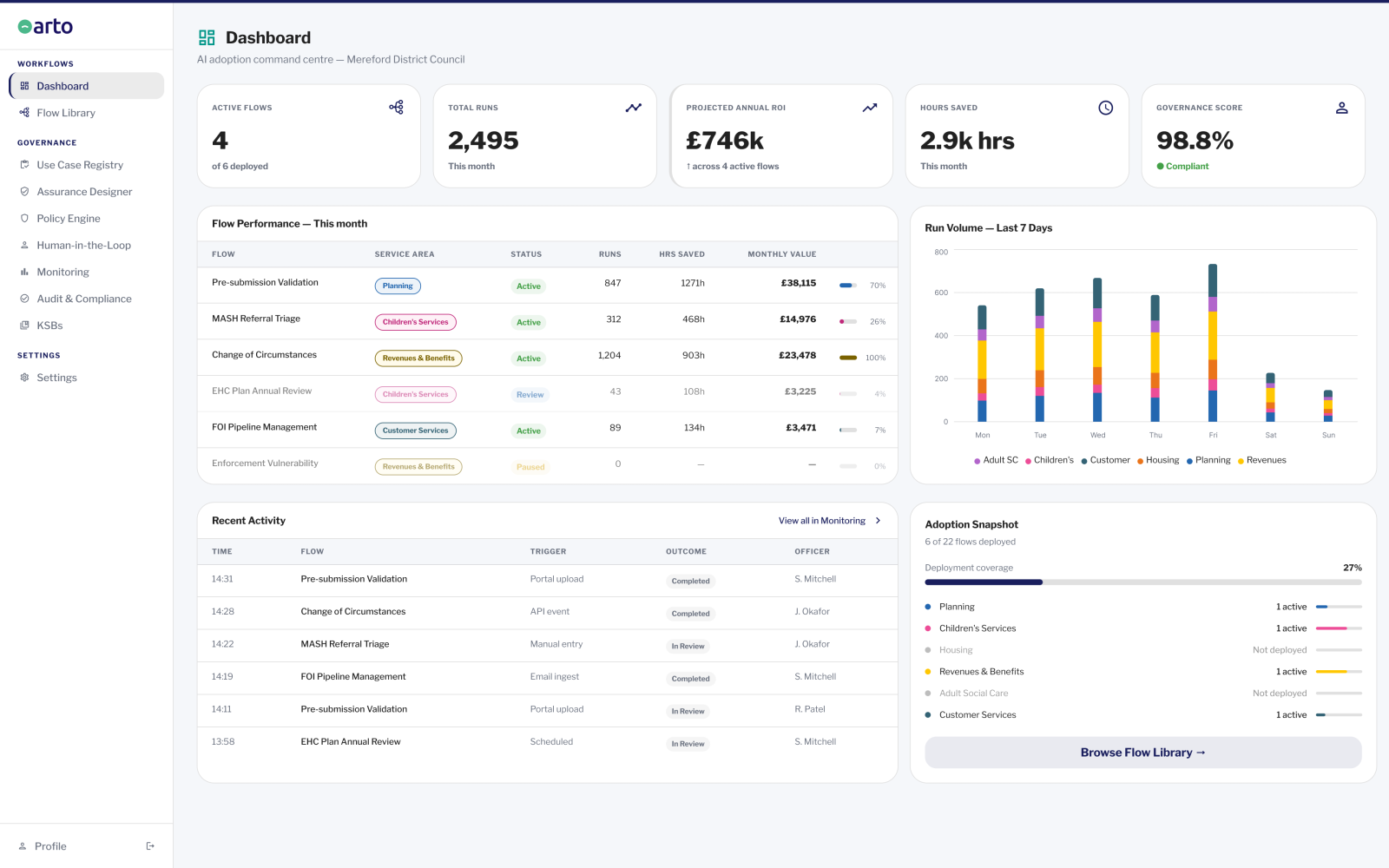
The question it answers: What AI tools and workflows are in use across the entire organisation, including tools not running on Arto?
What it shows: A single, automatically populated register of every AI flow registered in the platform, covering both Arto Supported Flows and Third-Party Flows. For each entry: the tool or workflow name, type (Arto Supported or third-party), the service area it operates in, the risk level assigned to it, and whether appropriate oversight is in place. Manual registration is no longer required. Every flow in the Flow Library is automatically surfaced here.
Scope boundary: The Use Case Registry shows registered tools. It does not show tools that staff are using without any registration. Shadow AI that has not been registered remains invisible until it is brought into the Flow Library.
HITL Control Centre: Third-Party Flows
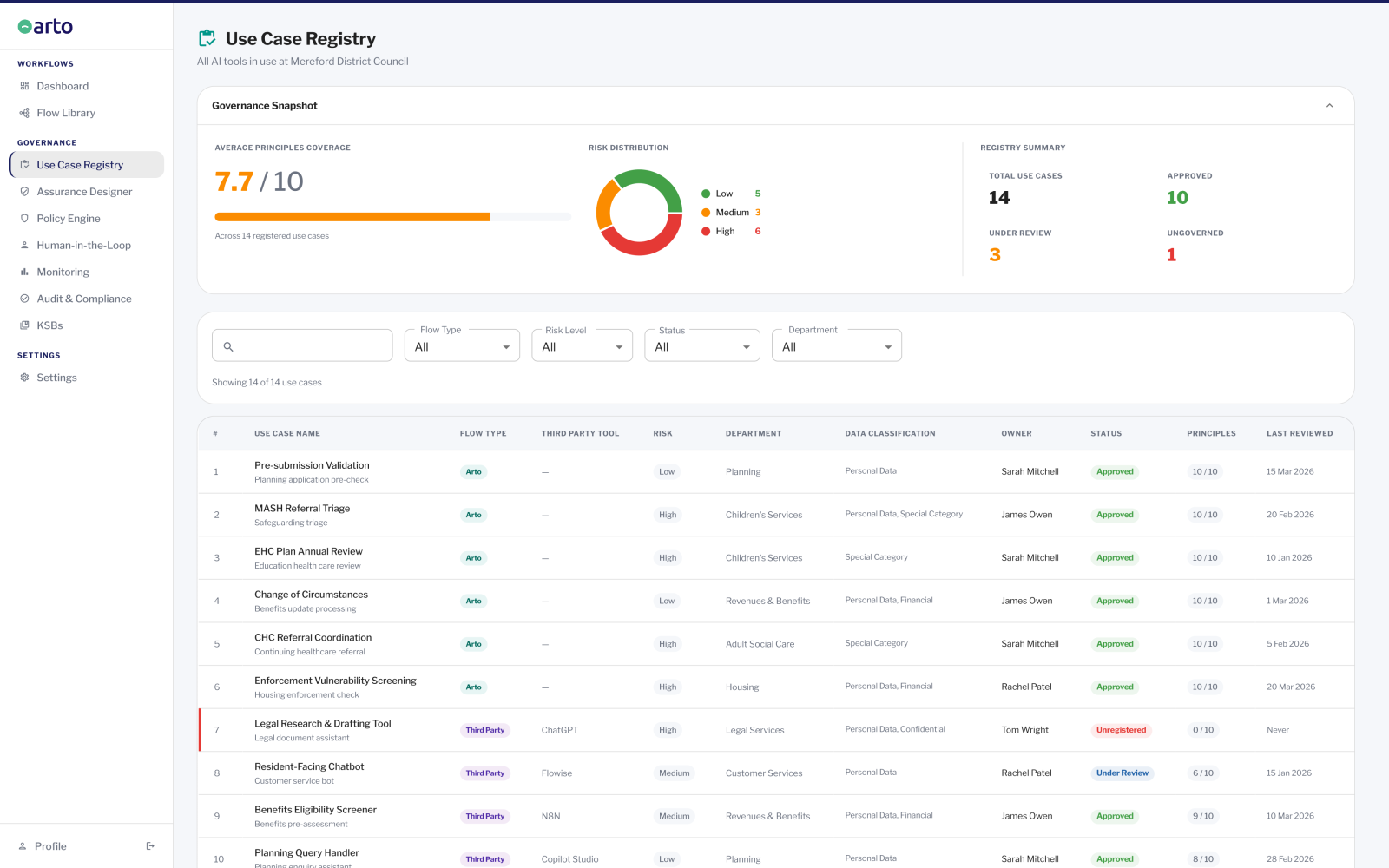
The question it answers: Which third-party AI tools in the organisation have human-in-the-loop steps configured, and which do not?
What it shows: A read-only register of third-party flows showing which tools have human-in-the-loop steps configured within Arto. This gives governance leads visibility of which third-party tools have oversight built in and which are operating without configured oversight. No management actions are available on this tab. It is observational only.
Scope boundary: HITL configuration status is shown for registered third-party flows. It does not manage or configure HITL for third-party tools (that is done in the flow configuration). It cannot show HITL status for unregistered tools.
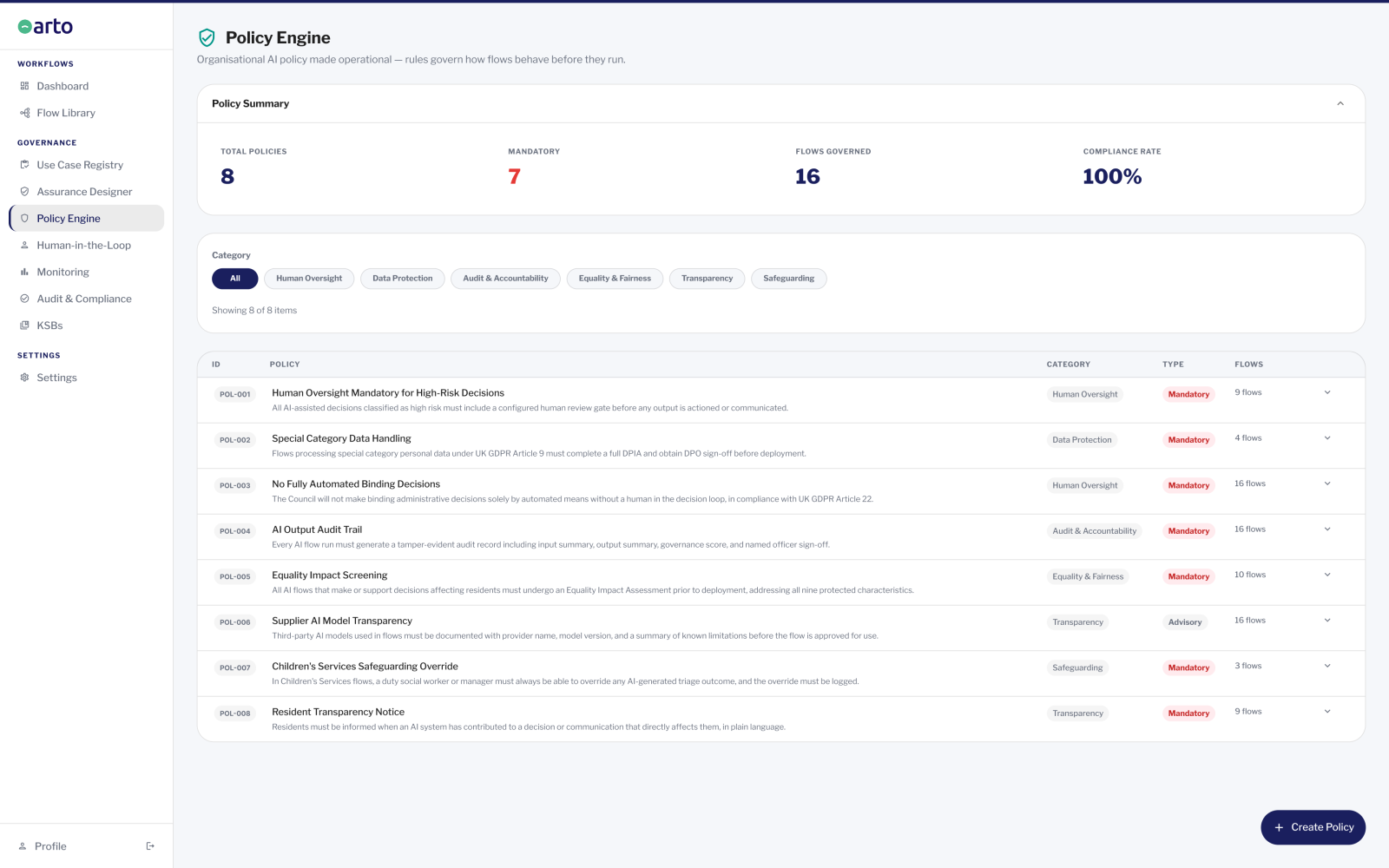
Policy Engine
The question it answers: What AI governance policies apply to which workflows across the organisation?
What it shows: A register of the organisation's AI governance policies (acceptable use policies, data handling policies, service-specific AI policies) linked to the individual flows they apply to. Shows which policies exist and which flows each policy has been linked to. Provides governance leads with the evidence that the organisation's AI policy framework is connected to its AI deployments.
Scope boundary: The Policy Engine shows which policies have been linked to flows by the organisation's team. It does not assess compliance against those policies. It does not create or manage policies (those live elsewhere: SharePoint, intranet, governance repositories), and does not auto-suggest policy links. Every record is manually created.
The questions governance leads can answer using the hub
A governance lead using the Arto governance hub can answer the following questions at any time, without requesting reports from individual service teams or waiting for governance audits:
Is the organisation's AI governance healthy right now?
The Monitoring dashboard's governance score, derived from Assurance Designer completion across all active Arto Supported Flows, gives a single health indicator. A score below threshold generates an active alert. The governance lead does not need to check individual workflows to know if something requires attention.
What AI is running in the organisation today?
The Use Case Registry shows every registered flow: Arto Supported Flows and third-party tools. By service area, by risk level, and by oversight status. The governance lead has a current register of the organisation's AI estate: not a list compiled at last year's audit, but the live record drawn from the Flow Library.
Which third-party tools have human oversight configured?
HITL Control Centre Tab 2 shows the oversight configuration status of every registered third-party flow. A governance lead can see at a glance which tools have human-in-the-loop steps built in and which are operating without configured oversight. This is the check that closes the gap between 'we know what tools are in use' and 'we know what governance those tools have in place'.
What AI governance policies apply to which workflows?
The Policy Engine shows which of the organisation's AI policies have been linked to individual flows. A governance lead preparing for an audit or responding to a scrutiny committee inquiry can demonstrate that the organisation's policy framework is connected to its operational AI deployments, not just a set of policies that exist in isolation.
Is any AI running without governance oversight?
Cross-referencing the Use Case Registry (what is registered) with HITL Tab 2 (what has oversight configured) surfaces flows that are registered but have no oversight configured. These are the flagged items that require governance attention. The hub makes this gap visible, which is the first step in addressing it.
In short: The governance hub gives governance leads the organisational visibility that the audit trail gives for individual decisions. It answers the question 'what is happening across our AI estate?' the way the audit trail answers 'what happened in this specific case?'
What the governance hub does not cover
The governance hub provides the governance team with the most complete available picture of AI across the organisation. There are four things it does not do, and understanding these boundaries helps governance leads use it correctly.
It does not monitor third-party tools at run level
The Monitoring dashboard covers Arto Supported Workflows only. Third-party tools (Copilot Studio workflows, Flowise flows, N8N automations, and other non-Arto AI) run outside the Arto platform and cannot be monitored at individual run level. The Use Case Registry shows that these tools exist and what risk level has been assigned to them. HITL Tab 2 shows whether oversight has been configured for them. But the run-by-run activity log and outcome distribution that the Monitoring dashboard provides for Arto Supported Flows are not available for third-party tools.
It does not detect or register shadow AI automatically
The Use Case Registry shows every flow that has been registered in the Flow Library. It does not automatically detect AI tools that staff are using without any registration. Shadow AI that has not been brought into the Flow Library remains invisible to the governance hub. The hub makes registered AI visible and governable. The governance team still needs a process for identifying and registering tools that are in use but have not been formally registered.
It does not assess compliance against policies
The Policy Engine shows which of the organisation's policies have been linked to which flows. It does not assess whether those flows are compliant with the linked policies. Compliance status — whether a flow has 'met' a policy — is not shown. The Policy Engine is a visibility tool, not a compliance auditing tool.
It does not replace the audit trail for individual decisions
The governance hub operates at the organisation level: what AI is in use, what governance it has, what the overall health is. The audit trail operates at the decision level: what happened in this specific workflow execution, who approved it, what was the output. A governance lead using the hub to understand the organisation's AI estate will still use the audit trail for specific case-level accountability queries.
If your organisation is already using Microsoft Copilot or other third-party AI
Most organisations that deploy Arto are already using Microsoft tools, including Copilot or Copilot Studio. The governance hub is designed specifically to work alongside existing tools, not to replace them.
Copilot Studio workflows built by your organisation can be registered in the Arto Flow Library as Third-Party Flows. Once registered, they appear in the Use Case Registry alongside Arto Supported Flows, giving the governance team a unified register of the organisation's AI estate. HITL Control Centre Tab 2 shows which Copilot Studio flows have human-in-the-loop steps configured, giving governance leads the oversight status view they need without requiring them to review each Copilot Studio deployment individually.
The governance team's responsibility for Copilot Studio flows does not transfer to Arto. Arto does not run those workflows, cannot generate run-level audit trails for them, and does not configure their governance. What Arto provides is visibility and a structured register, ensuring that Copilot Studio deployments are known, assessed at a risk level, and can be demonstrated to have oversight in place where required.
Where to go from here
The audit trail
How individual decision-level accountability records work: the case-level complement to the governance hub's organisation-level view.
Audit trailGetting DPO sign-off
How to use the governance hub's visibility outputs as part of the DPO approval process for new AI deployments.
DPO sign-offHow Arto and Copilot work together
The full account of how Arto provides governance visibility of Microsoft Copilot Studio and other third-party AI tools.
Arto vs Copilot