
Most service teams deploy an existing workflow. They do not build one from scratch.
When service leads ask whether a non-technical team can build and manage an AI workflow, the question they are usually asking is: 'Do we need to hire a developer or bring in IT to make this work?' The answer to that question is no, for the most common deployment path.
Arto Supported Flows are pre-built workflows maintained and published by the Arto team. They are designed for specific public sector service areas. When your organisation deploys an Arto Supported Flow, the workflow already exists, the AI agent already has its KSB-mapped scope defined, the governance framework is already applied, and the compliance checks run automatically. Your team's task is to configure the workflow for your specific service context, connect it to your back-office systems, review the Assurance Designer record, and activate it.
This is a service configuration task, not a technical development task. The people who typically run this process are governance leads, service managers or digital service coordinators, not software engineers.
IN SHORT: For Arto Supported Flows, non-technical teams configure and activate a pre-built workflow. The AI, the governance framework, the compliance checks and the audit trail are already set up. No coding is required.
What comes with an Arto Supported Flow, with no setup required
When a service team activates an Arto Supported Flow, the following are already in place before the workflow processes a single piece of resident data.
Governance controls included as standard
Governance checks run automatically
Arto Supported Flows are designed and built to align with key standards including ISO 27001, ISO 42001 and UK GDPR. An assurance case aligned to the 10 GDS AI Playbook principles is pre-populated and ready to deploy. Minimal configuration is required from the service team.Set up by: Arto. No configuration required from the service team.
Audit trail generated on every run
Every workflow execution produces a timestamped, immutable audit record: what the AI processed, what it recommended, who reviewed it, what they decided. The audit trail does not need to be switched on or configured. It exists for every run from the first day of deployment.Set up by: Arto. The service team can view and export records. No setup required.
Human oversight enforced at decision points
Arto Supported Flows have HITL (human-in-the-loop) gates pre-configured at the decision points where officer review is required. Officers review and sign off AI outputs through the HITL Control Centre, a queue-based interface that does not require technical skills to use.Set up by: Arto pre-configures the gates. Officers use the HITL Control Centre to review
What managing an AI workflow looks like after deployment
Once an Arto Supported Flow is activated and live, day-to-day management involves three types of task. None requires technical skills. The people who typically do this work are the same officers and service managers who manage the service area the workflow supports.
Who does it | What the task is | Where in Arto | Typical time |
Case officer | Review AI output for a specific case: a triage summary, a validation check, a calculation. Approve or send back. Record decision. | HITL Control Centre. Review panel shows AI output and case context. Officer clicks approve or send back. | 2–10 minutes per case |
Service manager / team lead | Check the monitoring dashboard: how many cases have run today, what the outcome distribution is, whether any governance alerts need attention. | Monitoring dashboard: run volume, outcome distribution, governance score, active alerts. No configuration needed. View is live from first run. | 5–15 minutes daily |
Governance / IT lead | Periodic review of the Use Case Registry and Assurance Designer. Confirm that assurance sections remain current. Review any policy updates required. | Use Case Registry for organisation-wide view. Assurance Designer for individual workflow governance record. Policy Engine for policy linkage. | As needed, not a daily task |
Service manager | If a workflow execution produces an unexpected output, review the run detail. If a systematic issue is identified, pause the workflow pending investigation. | Flow Library, Run History tab for individual run detail. Workflow can be paused from the flow management page. | As needed |
If your service area is not in the pre-built library
Arto Supported Flows cover the six service areas most commonly requested by councils: planning, children's services, revenues and benefits, contact centre, housing and adult social care. If your service area falls outside these, or if you need a workflow variant that differs from the standard configurations, there are two routes.
Route 1: Register a third-party workflow
If your organisation is already running AI workflows in Copilot Studio, Flowise, N8N or another tool, those workflows can be registered in the Arto Flow Library as Third Party Flows. Once registered, they appear in the Use Case Registry alongside Arto Supported Flows, and the HITL Control Centre's Tab 2 shows which ones have human-in-the-loop steps configured. This brings existing third-party deployments into the Arto governance framework without requiring them to be rebuilt.
Third Party Flows do not have the same automatic governance inheritance as Arto Supported Flows — governance is configured manually within Arto rather than pre-populated. But the Use Case Registry entry and the governance configuration process mean the workflow is visible, registered and accountable.
Route 2: Work with the Arto and Invuse team to build a new flow
For service areas not currently covered by the Arto Supported Flow library, the Arto team, working with Invuse (the delivery arm of the INV Group), can work with your organisation to scope and build a new workflow. This involves a structured requirements process, governance design, and a test and activation process before go-live. This route does require more time and organisational input than activating a pre-built flow, but it produces a workflow that is specific to your service context.
The Arto POC Flow specifications — the detailed technical documents behind the planning, children's services, revenues and benefits and contact centre workflows — came from this co-design process with councils. Workflows built in this way are designed to become part of the Arto Supported Flow library, making them available to other councils in future.
What deploying an Arto Supported Flow involves
Activating an Arto Supported Flow involves the following steps. Most can be completed without technical skills. Steps that typically involve the governance or IT lead are flagged.
Browse the Flow Library and select the workflow for your service area. Review what the workflow does, what data it processes, and what the governance configuration looks like.
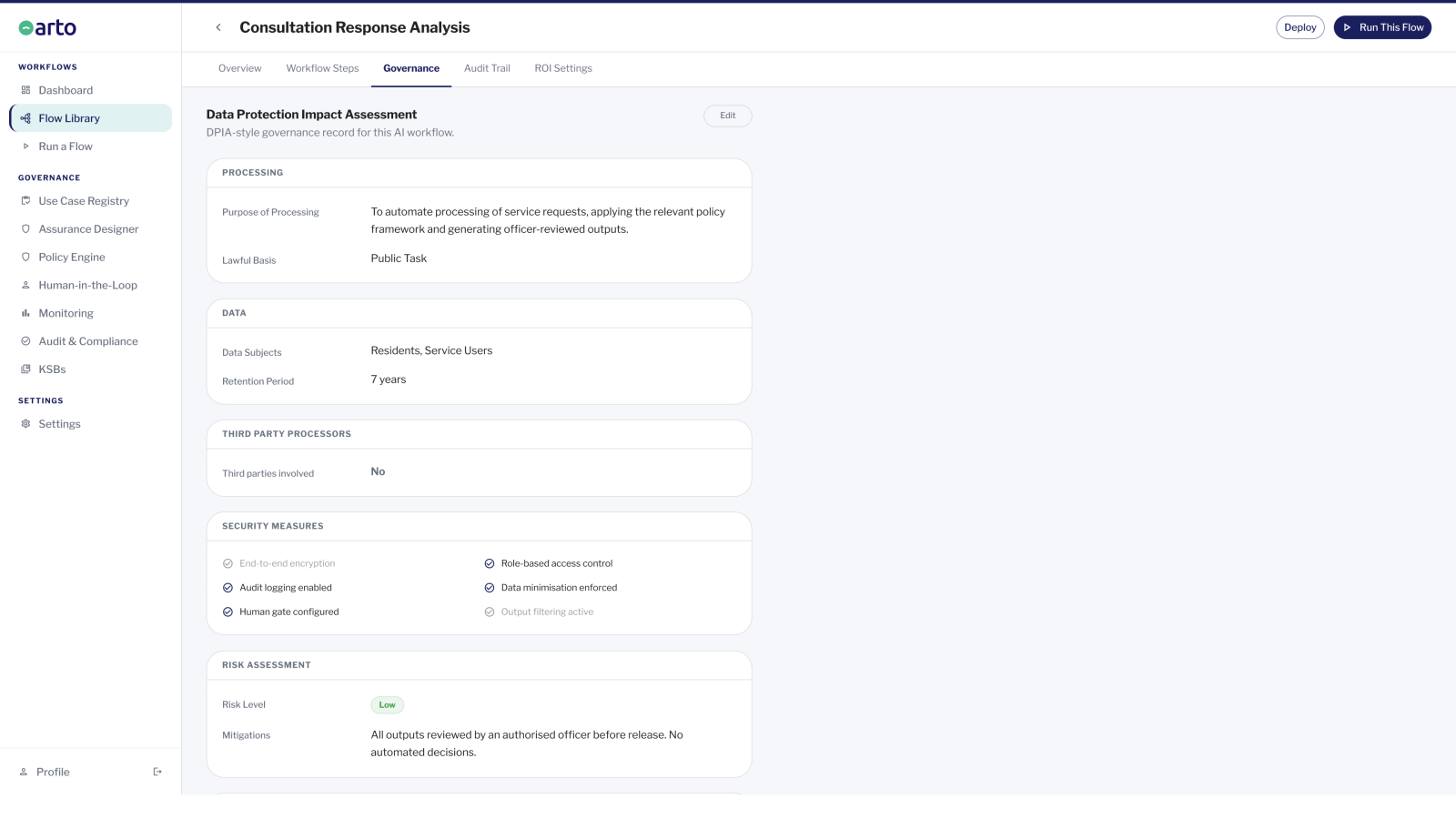
Complete the Assurance Designer for the selected workflow. For Arto Supported Flows, most sections are pre-populated. Review them, add your organisation's specific context (service area lead, relevant policies, senior responsible officer), and confirm the data scope is appropriate.
Governance / IT lead step: obtain DPO sign-off on the completed Assurance Designer record and DPIA. This step is required before processing live resident data.
Run a test execution against non-live data. Confirm the workflow is operating as expected and review the assurance case.
Activate the workflow for live data processing. From the first live run, audit records are generated automatically.
Assign the review queue in the HITL Control Centre to the appropriate officers. Brief them on the review process. The interface is designed for daily operational use, not for technical users.
Where to go from here
Browse pre-built workflows
Every Arto Supported Flow, organised by service area: planning, children's services, revenues and benefits, contact centre, housing and adult social care.
Workflow libraryHow governance is built in
The full governance architecture that comes with every Arto Supported Flow, including standards alignment, HITL gates, audit trail and pre-populated assurance case.
Governance foundationTalk to us about your service area
Not sure which workflow is right for your context? Tell us your service area and where you are in the process.
Get started